Software: VS-Code version 1.12.2
Snippets code are templates that make it easier to enter repeating code patterns, such as loops or conditional-statements.
For me, I use snippets code for some statements that I use for debugging with PHP.
Here is how to create snippets code for debugging in PHP.
In VS Code, Open Preferences -> User Snippets --> Choose a Language (for me PHP)
Add some code below.
[gist https://gist.github.com/vanduc1102/13d92493c33fd5e936a974c3e7adfb34 /]
https://gist.github.com/vanduc1102/13d92493c33fd5e936a974c3e7adfb34.js
From now, I can use my snippets code by typing prefix.
Showing posts with label dev. Show all posts
Showing posts with label dev. Show all posts
Saturday, September 16, 2017

Friday, September 15, 2017
Colorizing logs with iTerm 2 console
Software: Iterm2 version 3.0.15
While developing web applications with iTerm2, I found it is quite difficult to read the logs come from Server.
Luckily, I use iTerm 2 so that I can config colorizing the logs simply.
Let begin.
In iTerm 2 -> open Preference -> Profile -> Advanced -> Trigger
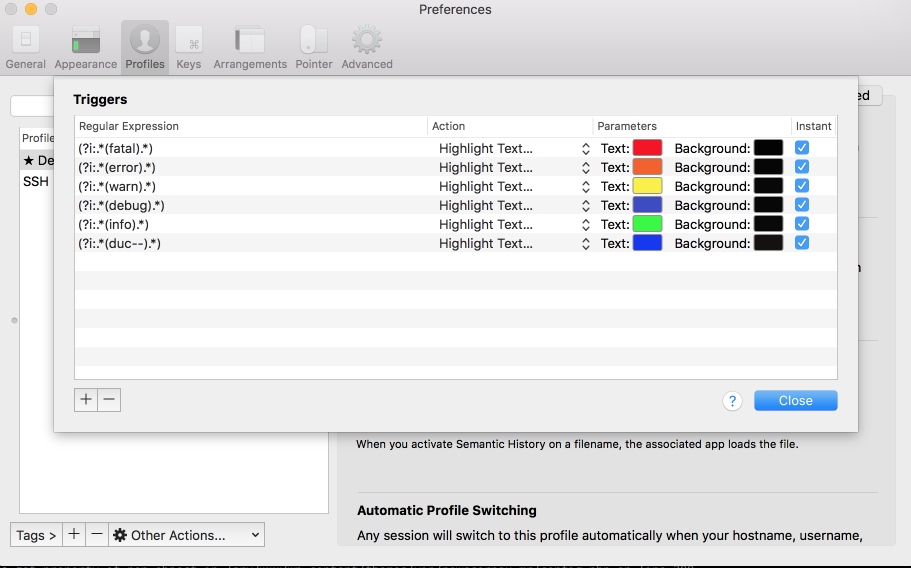
The Regular Expression reference is conformed ICU's Regular Expressions
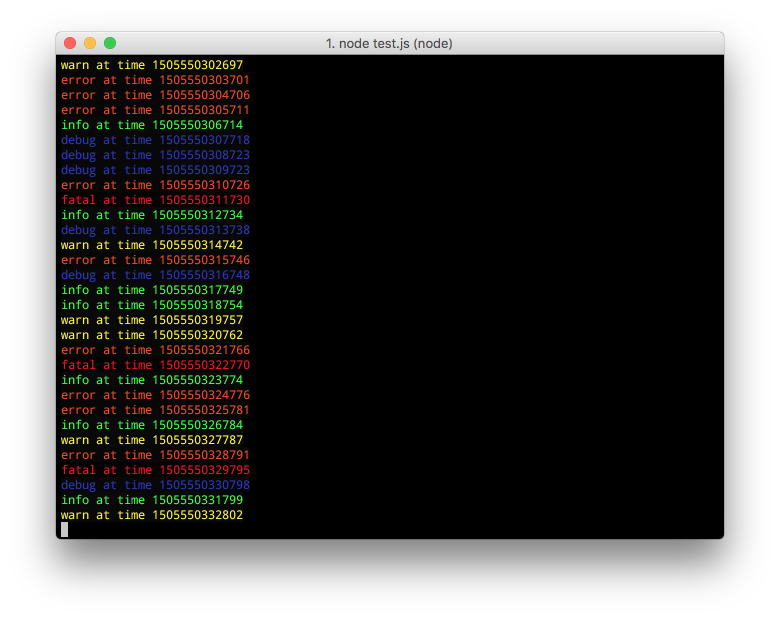
Result:
Regex lists:
[code lang="cpp"]
(?i:.*(fatal).*)
(?i:.*(error).*)
(?i:.*(warn).*)
(?i:.*(debug).*)
(?i:.*(info).*)
[/code]
While developing web applications with iTerm2, I found it is quite difficult to read the logs come from Server.
Luckily, I use iTerm 2 so that I can config colorizing the logs simply.
Let begin.
In iTerm 2 -> open Preference -> Profile -> Advanced -> Trigger
The Regular Expression reference is conformed ICU's Regular Expressions
Result:
Regex lists:
[code lang="cpp"]
(?i:.*(fatal).*)
(?i:.*(error).*)
(?i:.*(warn).*)
(?i:.*(debug).*)
(?i:.*(info).*)
[/code]
Subscribe to:
Posts (Atom)