Showing posts with label logger. Show all posts

Wednesday, October 24, 2018

Spring Boot Sleuth and ZipKin

This post is my implementation of the post here: https://reflectoring.io/tracing-with-spring-cloud-sleuth/


Although the post already included the source code, but it is still pretty hard for me to start


So I created this post to help me to remember how to make Slueth and Zipkin work.


Spring Cloud Sleuth


will add traceId and spanId to logger
<dependency>
<groupId>org.springframework.cloud</groupId>
<artifactId>spring-cloud-starter-sleuth</artifactId>
<version>${spring-cloud.version}</version>
</dependency>

Analyze Traces with ZipKin


Logger collector and analytics
<dependency>
<groupId>org.springframework.cloud</groupId>
<artifactId>spring-cloud-starter-zipkin</artifactId>
<version>${spring-cloud.version}</version>
</dependency>

spring.sleuth.sampler.percentage=1.0


Is percentage of sampler, the default value is 0.1 ( 10%) that means you only take 10% of request to sampler


Change to 1.0 ( 100% ) to sample all of request.


Repo URL: https://github.com/vanduc1102/tutorials/tree/master/spring-sleuth


Sunday, September 24, 2017

How to print DEBUG in PHP

While I am new to PHP, sometimes I find it is hard to debug and something in PHP.

I added some notes here will help me to summarize the way that I used to debug.

Predefined constants


PHP has a large number of predefined constants. we have seven most important, most practical and most useful PHP Magic Constants.

__FILE__ – The full path and filename of the file.
__DIR__ – The directory of the file.
__FUNCTION__ – The function name.
__CLASS__ – The class name.
__METHOD__ – The class method name.
__LINE__ – The current line number of the file.
__NAMESPACE__ – The name of the current namespace

Print variables


1. var_dump

[code lang="php"]

void var_dump ( mixed $expression [, mixed $... ] )

[/code]

Print a variable and continues to execute the script

I have a snippet code in VSCode for the function:

[code lang="javascript"]

"Echo to webpage": {
"prefix": "duk--echo",
"body": [
"echo('<pre class=\"duk--\">' . __FILE__ . ':' . __LINE__ ); var_dump( $data ); echo('</pre>');"
],
"description": "Echo to webpage"
},

[/code]

2. die


This language construct is equivalent to exit().


[code lang="php"]
void exit ([ string $status ] )
[/code]


My snippet code:
[code lang="javascript"]
"Die to webpage": {
"prefix": "duk--die",
"body": [
"var_dump( $1 ); die();"
],
"description": "Echo to webpage"
}
[/code]

That will print a variable before existing.


Error Handling Functions


Method:
[code lang="php"]
bool error_log ( string $message [, int $message_type = 0 [, string $destination [, string $extra_headers ]]] )
[/code]

Links


var_dump: http://php.net/manual/en/function.var-dump.php
Error Handling Functions: http://php.net/manual/en/ref.errorfunc.php
die: http://php.net/manual/en/function.die.php

Friday, September 15, 2017

Colorizing logs with iTerm 2 console

Software: Iterm2 version 3.0.15

While developing web applications with iTerm2, I found it is quite difficult to read the logs come from Server.

Luckily, I use iTerm 2 so that I can config colorizing the logs simply.

Let begin.

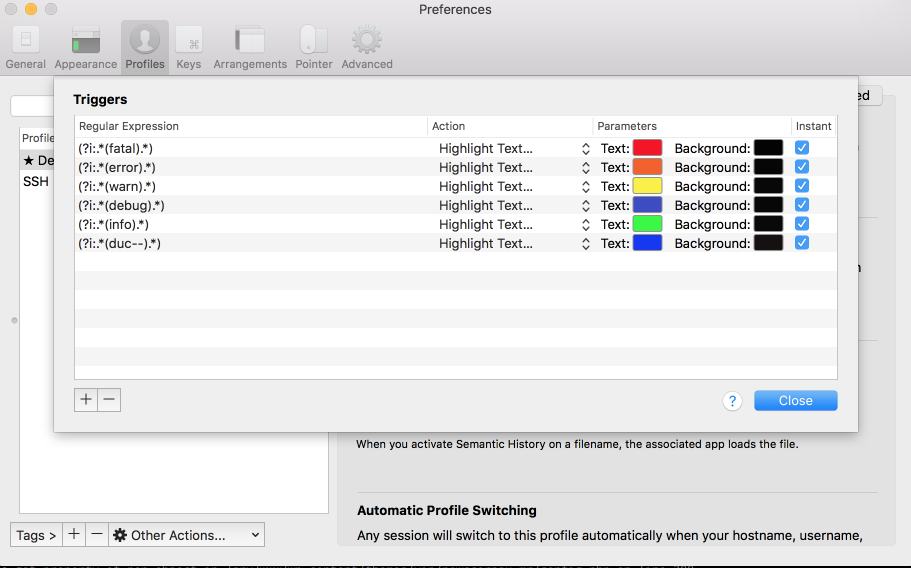
In iTerm 2 -> open Preference -> Profile -> Advanced -> Trigger

iterm2-trigger-regex

The Regular Expression reference is conformed ICU's Regular Expressions

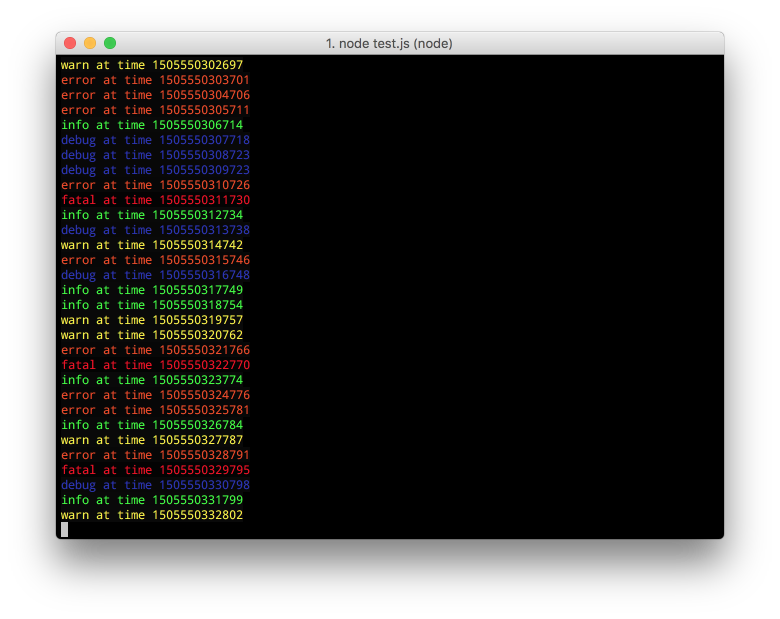
Result:

iterm-2-logger-colorized

Regex lists:

[code lang="cpp"]

(?i:.*(fatal).*)

(?i:.*(error).*)

(?i:.*(warn).*)

(?i:.*(debug).*)

(?i:.*(info).*)

[/code]